Fulltext search relevance configuration
Search relevance configuration is editable via a dedicated screen in the back-office.
Located under ELASTICSUITE > Search Engine > Search Relevance > Relevance Configuration.
Fulltext base settings
This panel contains base fulltext configuration settings.

| Parameter | Default value | Description |
|---|---|---|
| Minimum should match | 100% | The minimum number of terms that should match a fulltext query (except stopwords managed by Cutoff Frequency, see the CutoffFrequency part below). You can look on the official documentation for minimum_should_match available values. |
| Tie breaker | 1 | The way to calculate documents scores. When set to 1, a document score will be the sum of all its fields score. If set to an arbitrary value of 0.3, document score will be its higher field score + the sum of each other fields score * 0.3. You can refer to the documentation about tie breaker. |
Phrase match configuration
Phrase matching enables you to apply a boost on documents that contains some of your search terms, in the same position relative to each others.
E.g : For the query “the little white horse”, we will look for documents matchin “little white”, “white horse” or “little white horse”.
This feature is based on ElasticSearch Shingle Token Filters, for which you can find more documentation here : ElasticSearch Shingle Token Filter
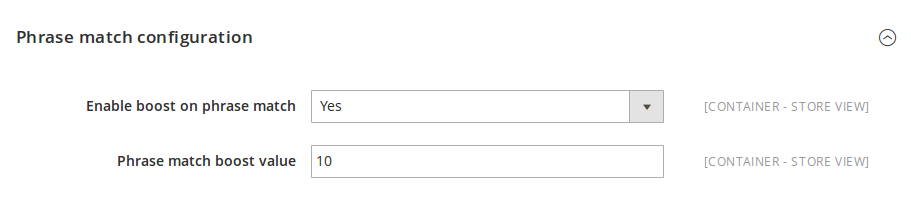
| Parameter | Default value | Description |
|---|---|---|
| Enable boost on phrase match | Yes | Set to “Yes” to enable phrase match. |
| Phrase match boost value | 10 | The boost that will be applied on documents considered as matches. |
Cutoff Frequency
Cutoff Frequency allows specifying an arbitrary frequency where high frequency terms (above the cutoff) are not scored for each query. This is used as an automatic stopwords detection based on their frequency in index.
You can go further with the official documentation here : ElasticSearch Cutoff Frequency

| Parameter | Default value | Description |
|---|---|---|
| Cutoff Frequency | 0.15 | The cutoff frequency value, as a float number between 0 and 1. |
Span Match Configuration
Span Match provides a mechanism to boost search results that contain the exact search terms at the very beginning of their attribute values.
⚠️ Language Relevance Warning: This feature’s effectiveness is highly dependent on your catalog’s language structure. It is very useful for languages where the core noun is typically placed at the beginning of a phrase (for example, in French: “Sac pour ordinateur”). However, it may not be as relevant for languages where the core noun often appears at the end of a phrase (for example, in English: “Laptop bag”). Please evaluate your catalog’s naming conventions before enabling this feature.
| Parameter | Default value | Description |
|---|---|---|
| Enable Boost on Span Match | Yes | Enables or disables the span match boosting mechanism globally. When enabled, products containing the search terms at the very beginning of the targeted attribute receive a relevance boost. |
| Span Match Boost Value | 10 | Defines the specific multiplier or boost weight that is applied to the product’s relevance score when a successful span match occurs. |
| Number of words to match at the beginning of the string | 1 | Specifies how many consecutive words at the very beginning of the attribute’s string must match the user’s search query in order to trigger the boost. |
Minimum Score Configuration
The Minimum Score feature allows you to set a baseline relevance threshold that products must meet to be displayed. This is especially useful if your catalog returns a very long tail of barely relevant products, as it prevents those low-relevance items from surfacing at the top of the page when a user applies a sort order like “Price” or “Name”.
| Parameter | Default value | Description |
|---|---|---|
| Use Min Score | Yes | Enables or disables the minimum score threshold mechanism for your search results. |
| Min Score Value | 0 | Defines the absolute minimum relevance score a document must achieve to be included in the results. Accepts an integer greater than 0. Any products with a relevance score lower than this defined value will be completely excluded from the search results. |
Exact Match Configuration
These settings allow you to fine-tune how the search engine handles “exact matches”, particularly for single-word searches and complex product references (like SKUs). They give you granular control over analyzers and relevance boosting to prevent exact matches from completely overshadowing valid stemmed variations (like singular/plural forms).
| Parameter | Default value | Description |
|---|---|---|
| [Experimental] Use default analyzer in exact matching filter query | Yes | Instead of forcing the standard analyzer for exact matching, enabling this tells the engine to use the specific default analyzer configured for each field. For example, it will match on sku.reference for SKUs, or field.standard_edge_ngram for fields using edge ngrams. This is highly useful for partial matching or matching at the beginning of words. |
| [Experimental] Use reference analyzer in exact matching filter query | Yes | When building the exact match filter query, this setting forces the engine to look into the unified reference collector field (which aggregates all searchable attributes using the reference analyzer) rather than relying solely on the hardcoded sku field. This significantly improves SKU and reference matching accuracy. |
| [Experimental] Enable single term custom boost values | Yes | By default, single-term exact matches apply a massive relevance boost to products containing the exact word typed, strongly favoring them over stemmed variations (e.g., singular vs. plural or conjugated verbs). Enabling this setting unlocks the two fields below, allowing you to customize and relax these default boosts. |
| [Experimental] Single term phrase match boost value | 10 | Defines the boost multiplier applied to the ‘whitespace’ (exact) match of an attribute when a single term is searched. For instance, an attribute with a search weight of 5 would get a boost of 50. Lower this value to reduce the scoring gap between exact whitespace matches and standard stemmed matches. |
| [Experimental] Single term sortable matches boost value | 20 | Defines the boost multiplier applied to the ‘sortable’ version of searchable and sortable attributes when a single term is searched. For instance, an attribute with a search weight of 5 would get a boost of 100. Lower this value to reduce the scoring gap between exact sortable matches and standard matches. |